
A spreadsheet, whether Excel, Google Sheets, or similar, lets you record and organise financial data in rows and columns. It’s often the first tool business owners reach for, but is it still enough in 2026?
Advantages and Disadvantages of Spreadsheets are important to understand for anyone regularly working with data.
This article explores both sides to help you determine if spreadsheets are the right tool for your needs.

What We Mean by “Spreadsheets” Here
Quick clarification before we go further. When people talk about spreadsheets for accounts, they usually mean:
- Microsoft Excel
- Google Sheets
- Occasionally Apple Numbers, though this is rare in a business context
We’re not talking about spreadsheet-style views inside proper accounting software like Xero or QuickBooks. Those are different beasts entirely, even though they might look similar on screen.
Spreadsheets Pros and Cons: Quick Summary
| Advantages of Spreadsheets | Disadvantages of Spreadsheets |
| Free or low-cost to use | High risk of manual data entry errors |
| No special training required for basic setup | No automatic audit trail to track changes |
| Highly customisable layouts and formatting | Severe version control issues when shared |
| Excellent for rapid business planning models | Does not natively comply with 2026/27 MTD laws (not compatible until some tool is connected) |
Advantages and Disadvantages of Spreadsheets
Along with tracking orders and finances, spreadsheets can be advantageous for maintaining the database. Being inexpensive, they’re simple and easy to use for a new company. They allow you to organise, manage and analyse data for your business growth.
However, they are not the perfect solution for all businesses. There are some setbacks: lack of flexibility or control, unreliability and limited capacity. With the limited features, it becomes less productive for many businesses.
So, let’s break down its advantages and disadvantages to get a broader view.
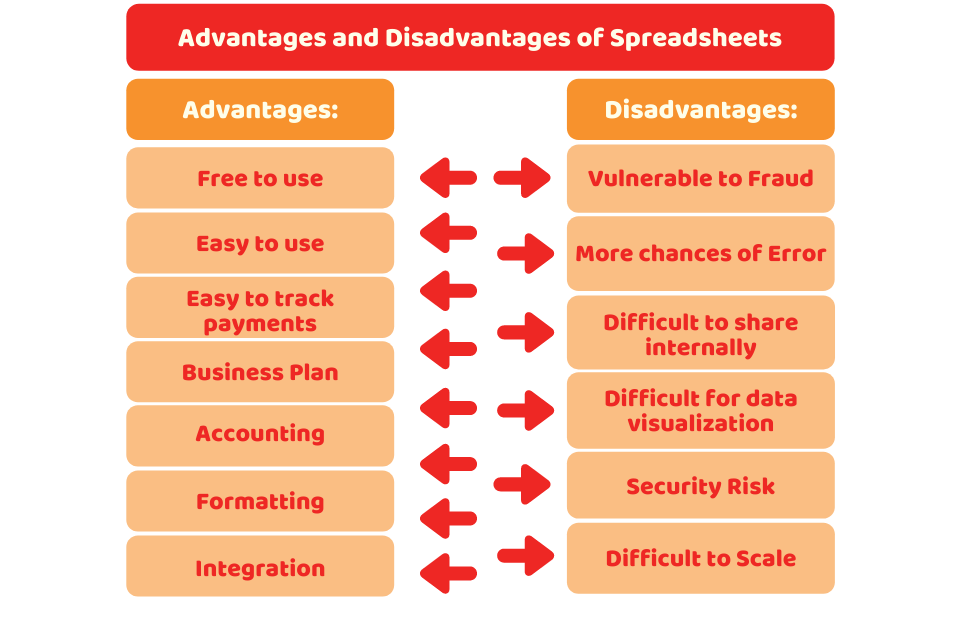
What Are the Advantages of Spreadsheets
Here are some of the common advantages of spreadsheets.
They’re free:
You can get access to spreadsheet software easily, and it’s most often free. The most common examples are Microsoft Excel and Google Workspace, where you can easily access them with just an internet connection.
Easy to Use:
The spreadsheet software is easy to use. Whether you want to manage your personal finances or want to make tables for any purpose, it is easy to use. Except for the use of complex formulas, anyone can record information in spreadsheets, and it doesn’t require special training.
Easy to Track Payments or Inventory:
Tracking payments and inventory can be a complex and time-consuming task, but spreadsheets make it easy for you. Spreadsheet software can be an affordable option to analyse the company’s earnings and spending.
Business Plan:
You can prepare a rough model of your business plan with this. In addition, you can use it to track various aspects of your company like legal structure, its strengths, weaknesses, revenue plan, etc. Besides, you can get many online templates for your business.
Accounting:
Accounting is one of the major functions of spreadsheets. If you’re an accountant and want free software to create a balance sheet, financial statements, or budget, you can use spreadsheets for it. Furthermore, you can also use them for expense tracking, forecasting and calculation of loans.
Integration:
You can integrate your spreadsheet software with other software to boost its productivity.
Formatting:
This software allows you to do formatting to navigate lots of financial data. With multiple formatting options, you can make your data visually appealing and understandable for the user. For example, adding titles, colouring, etc.
What Are the Disadvantages of Spreadsheets
Though spreadsheets are free and easy to use they’re not suitable for all businesses due to:
Vulnerable to fraud:
A spreadsheet is vulnerable to fraud as there is no sole control that makes it accessible to any other person to change formulas, values etc. And, these changes cannot be detected.
Chances of error:
There are more chances of human error when using this software for a large amount of data. A small mistake can cost you thousands of pounds.
Difficult to share internally:
If a single person is managing the spreadsheet, it works well. But if there are more members added to the team, it’d be difficult to share and update the spreadsheet information with the whole team.
Difficult for data visualisation:
Though you can prepare charts and graphs on spreadsheets assembling the visual data on it is a daunting task.
Security Risk:
Commonly, spreadsheets are not secure and have a greater risk of mismanagement. Besides, sensitive information can’t be protected from hackers, even if it is protected by a password.
Difficult to Scale:
Once your business starts growing, its customer list, sales, etc also increases. However, if you make a large spreadsheet, it is more prone to errors and mistakes. Moreover, large spreadsheets are troublesome for users and management alike.
Not Built for Making Tax Digital
This is the big one for 2026/27. Under MTD, businesses need to keep digital records and submit information to HMRC using compatible software. A standalone spreadsheet doesn’t tick that box on its own. You’d need what’s called bridging software to connect your spreadsheet to HMRC’s system. It’s doable, but it’s an extra step, an extra cost, and an extra thing that can go wrong.
When Spreadsheets Are Acceptable vs When You Need Proper Software
When Spreadsheets Are Acceptable
- You are a brand-new hobby business or casual sole trader.
- Your gross qualifying income (total turnover before expenses) falls below the current £50,000 threshold and also sits safely under the upcoming £30,000 threshold taking effect in April 2027.
- You are only prototyping a temporary business idea or financial model.
- You handle fewer than 20 financial transactions per month.
When You Need Proper Software
- Your gross qualifying income exceeds the £50,000 MTD mandatory threshold.
- You employ team members who need simultaneous access to financial data.
- You manage physical stock and need real-time inventory tracking.
- You’re spending hours reconciling figures instead of running your business.
If you fall into that second group, it’s worth talking to an accountant about moving to proper software before it becomes a bigger job to untangle. Thus, if you use spreadsheets, you must pair them with HMRC-compatible bridging software to submit your digital tax returns legally
HMRC Making Tax Digital (MTD) Requirements: Spreadsheets Alone Won’t Comply
If you use spreadsheets for UK business accounting, it’s important to understand the Making Tax Digital (MTD) rules. For the 2026/27 tax year, a standalone spreadsheet on its own will not meet HMRC’s digital submission requirements for many businesses.
However, you can still keep records in a spreadsheet if it is linked to MTD-compatible software that submits your information to HMRC.
Here’s what you need to know:
- MTD for ITSA is Live: Since April 2026, sole traders and landlords with gross qualifying income over £50,000 have had to follow MTD rules.
- The Digital Links Mandate: You can still record transactions on a spreadsheet, but you cannot copy-paste data into HMRC portals manually.
- Bridging Software Required: Your spreadsheet must feature an unbroken digital link to HMRC-approved bridging software to submit your returns.
Can I Use a Spreadsheet and Still Comply With Making Tax Digital?
Yes, this is possible, but you’ll need what’s known as bridging software. This connects your spreadsheet to HMRC’s system so that your digital records count as compliant.
It’s a popular middle ground for businesses that like their spreadsheet setup but need to meet MTD requirements without a full accounting software switch.
It does add a bit of extra cost and setup though. But it is definitely worth weighing that against simply moving to proper software instead.
When Should I Switch From Spreadsheets To Accounting Software?
A good rule of thumb is once you’re spending more time fixing or double checking your spreadsheet than actually using it to run your business.
Other clear signals include VAT registration, taking on employees, your income crossing MTD thresholds, or simply having so many transactions that formulas start breaking.
There’s no fixed number that applies to everyone, but most businesses know instinctively when the spreadsheet has become more hassle than help.
Quick Summary
- Spreadsheets are cheap, flexible, and familiar, which is why so many small UK businesses still use them
- The main disadvantages are human error, no automatic bank feeds, weak audit trails, poor scalability, and not built for Making Tax Digital
- Under MTD for Income Tax, spreadsheets need bridging software to stay compliant
- MTD thresholds are £50,000 from April 2026 and £30,000 from April 2027
- Spreadsheets work well for very simple, low-volume businesses
- Once you grow, take on VAT, or hire staff, proper accounting software usually makes more sense
The Bottom Line
To sum up, we can say that you need to consider the advantages and disadvantages of spreadsheets before utilising them for your business. As a general rule, you need to remember that spreadsheets are suitable for small businesses or sole traders that deal with small data.
So, once your income grows or once MTD thresholds start applying to you, you need to use other software for reliability, accuracy and saving time.

How Accotax Can Help
If you’re weighing up the advantages and disadvantages of spreadsheets for your own business and you’re not sure which side of the line you fall on, we’re happy to have an honest look and tell you straight.
Our team works with sole traders, landlords, and small limited companies across the UK, helping them get set up properly for Making Tax Digital. Explore our tailored bookkeeping services to upgrade your financial setup, secure your data, and guarantee total MTD compliance.
Disclaimer: This blog is intended to provide general information on the “Advantages and Disadvantages of Spreadsheets.”
